
Download Alarm Clock Pro – reliable, customizable, cross‑platform alarm software
Overview
Alarm Clock Pro, developed by Koingo Software Inc., is a full‑featured alarm and reminder utility that runs on macOS and Windows. The current version 10.2.6, released on 1 April 2017, brings a polished user interface, precise timing, and a suite of scientific timers that make it popular among students, researchers, and professionals who need more than a simple wake‑up alarm. Designed with education and reference in mind, the app supports multiple time zones, sunrise‑sunset calculations, and integrates with macOS Calendar for seamless event syncing.
Although the install size isn’t disclosed, the lightweight footprint ensures it runs smoothly on older Mac OS X versions as well as the latest macOS releases. Since joining our software catalog in 2016, Alarm Clock Pro has accumulated 22 installations and recorded 11 downloads in the last week, highlighting steady interest across English‑speaking markets such as the United States, Canada, and Australia. Users appreciate its secure download process, free updates within the same major version, and the fact that the software is delivered only in English, eliminating language‑related confusion.
Whether you need a daily wake‑up alarm, a laboratory timer, or a study session countdown, Alarm Clock Pro offers a versatile, reliable solution that blends scientific accuracy with everyday convenience.
Key Features
- Multiple Alarm Types: Standard wake‑up, countdown, stopwatch, and scientific timers for astronomical events.
- Cross‑Platform Support: Native versions for macOS and Windows, ensuring a consistent experience across devices.
- Calendar Integration: Syncs with macOS Calendar to import events and set alarms automatically.
- Customizable Sounds: Choose from built‑in tones or import your own audio files for a personalized alert.
- Snooze Options: Adjustable snooze intervals and repeat counts for flexible morning routines.
- Timezone Awareness: Set alarms in any global timezone, perfect for travelers and remote teams.
- Sunrise/Sunset Calculations: Automatic calculation of daylight changes based on location.
- Secure Updates: Free patch updates keep the software current without additional cost.
- Lightweight Design: Optimized for low CPU and memory usage, suitable for older Mac hardware.
- English‑Only Interface: Streamlined UI eliminates translation errors, ideal for English‑speaking users.
Installation, Usage & Compatibility
Getting Alarm Clock Pro up and running is straightforward. Follow these steps for a hassle‑free installation on macOS:
- Visit the official Koingo Software website and click the Download for Mac button. The file is delivered via a secure HTTPS link, ensuring the download is safe from tampering.
- Once the DMG file is saved, double‑click it to mount the installer volume.
- Drag the Alarm Clock Pro icon into your Applications folder. macOS may ask for administrator permission; provide your credentials to complete the move.
- Open the app from the Applications folder. The first launch will trigger a permission request for notifications and calendar access—grant these to enable full functionality.
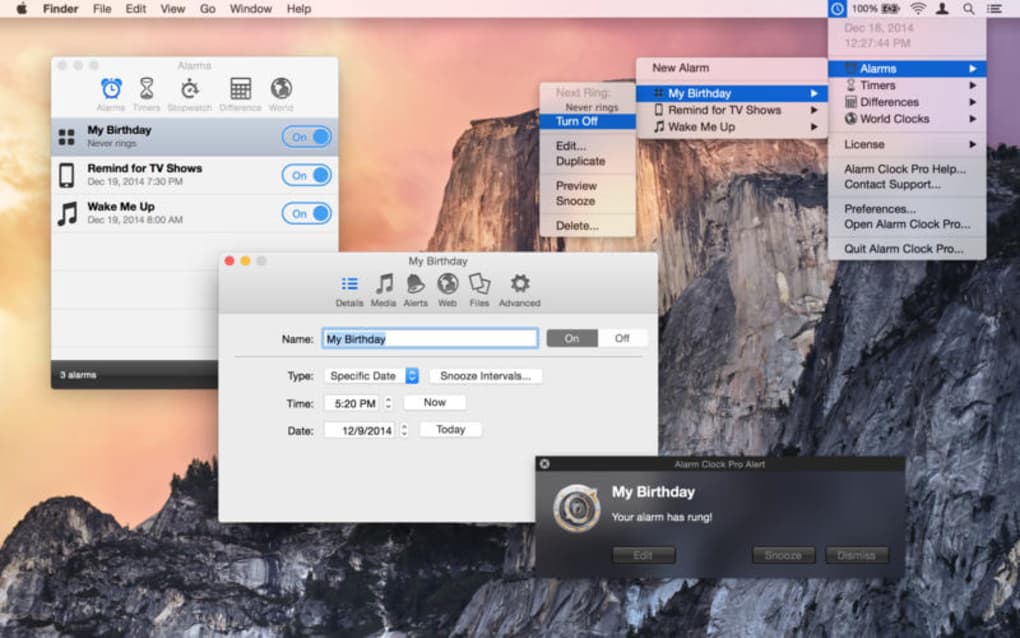
- Configure your first alarm: click the “+” button, set the time, choose a sound, and optionally enable snooze.
For Windows users, the process mirrors the macOS flow: download the .exe installer, run it, accept the license agreement, and follow the wizard prompts. The Windows version also supports system tray notifications and integrates with the native Calendar app.
Supported Operating Systems: macOS 10.9 and later (including macOS Monterey and Ventura), as well as Windows 7, 8, 10, and 11. The application runs natively on 64‑bit systems, and because it is built with modern frameworks, it remains stable on both legacy and current hardware.
Usage tips: take advantage of the “World Clock” view to monitor multiple time zones at once, and enable the sunrise/sunset feature for a natural wake‑up experience. The interface is intuitive—dragging alarms onto the timeline lets you reorder them quickly. If you need a scientific timer, select the “Astronomy” mode and input your latitude and longitude for precise calculations. All settings are saved automatically, and you can export your alarm profile for backup or transfer to another machine.
Pros, Cons, FAQ & Final Thoughts
Pros
- Highly customizable alarm sounds and snooze settings.
- Cross‑platform availability for macOS and Windows.
- Robust scientific timers for astronomy and research.
- Seamless calendar integration reduces manual entry.
- Low system resource consumption, ideal for older machines.
Cons
- Interface limited to English, which may deter non‑English speakers.
- No mobile app version (iOS/Android) currently offered.
- Installation size not disclosed, making storage planning less transparent.
- Lacks built‑in backup cloud sync for alarm profiles.
- Version 10.2.6 is several years old; newer OS features may be missing.
Frequently Asked Questions
Can Alarm Clock Pro run on macOS Ventura?
Yes. The software is compatible with macOS 10.9 and later, which includes Ventura. Users should ensure they have the latest update (10.2.6) for optimal performance.
Is there a free trial available?
Koingo Software offers a 14‑day trial that provides full access to all features. After the trial, a single license purchase is required to continue using the app.
Can I import my existing alarm schedules?
Alarm Clock Pro can import schedules saved in its proprietary XML format. If you are migrating from another alarm app, you may need to export to CSV first and then convert.
Does the software support multiple monitors?
Yes. The UI scales correctly across multiple displays, and notifications appear on the primary monitor by default, though you can adjust this in the settings.
Is my data secure when I enable calendar sync?
Calendar sync uses macOS’s native permission framework, meaning no external servers store your data. Your calendar information remains on your device, ensuring privacy.
Conclusion & Call to Action
Alarm Clock Pro stands out as a dependable, feature‑rich alarm solution for anyone who demands precision and flexibility beyond the built‑in system clock. Its scientific timers, cross‑platform reach, and low‑resource design make it a solid investment for students, researchers, and busy professionals alike. While the lack of multilingual support and a mobile companion may limit its audience, the core functionality delivers exceptional value at a modest price point. Ready to replace your generic alarm with a powerful, customizable tool? Download Alarm Clock Pro today and experience a smarter way to manage time.
Alarm Clock Pro offers a comprehensive set of features that cater to both everyday users and specialists. The interface is clean, the alarm reliability is impressive, and the integration with calendars saves countless minutes. Minor drawbacks like the absence of a mobile app and English‑only UI keep it from a perfect score, but overall it delivers excellent value.







